Showing posts with label Softwares. Show all posts

Thursday, May 31, 2012

Recover Your Permanently Deleted Files By Kissass Undelete


Hello friends... here is a new interesting software sometimes we may delete some files and then after that we may feel that we may did a mistake deleting those files..

so  here is a solution for it.
i recently tried and found this software.
A Software called "Kissass Undelete" , can bring those files from the hard disk or your flash drive.
Conditions : Only if the data on that drive is not re-occupied(or written). that means the space which was available after the deletion is not been occupied after the deletion.
Click Here to download the software.
1) Just Select the drive of the Windows and Click the scan button.
the Scan might take upto some time (just some seconds).
2) When the search is completed, it will show you the results with all the details like its name, type, size and the last modified date of the searched file.
3) Now select the file to be recover. This is an Open source application and available for All Windows OS(Windows XP/Vista/ 7).
try it guys... i have tested it just now.

Wednesday, May 16, 2012

Convert 1Gb Memory card / Pendrive / HDD To 2GB

Convert 1Gb Memory card / Pendrive / HDD To 2GB


First of all we have to make sure that its a 1 GB ( 970+ Mb ) memory card. This only works on 1GB (970+ Mb) And it supports only in some of the rare cases of memory cards.
Now Backup all your data in that because we have to format the drive.
After backing up now open the Skimedi Fix 2GB Capacity application.
A small window will pop up showing the FIX and Cancel option. And you have to browse the drive where it is located (generally G: or L: drive for USB sticks)
After selecting the drive press on FIX and then the updating process will be followed up. It will ask your conformation whether you agree to format or not. click on yes.
Later it will ask to replug the device. Just replug the memory stick card and put it back. The size of the memory will be increased from 1Gb to 2Gb. you can see the properties before and after the cracking process.
After that you can also check the memory size in phone and also you can test the size by copying all the data to it which is around 2Gb.

 Download | 166.88 KB

Sunday, May 13, 2012

Adobe Photoshop 7.0 Full Version Free Mediafire Download


Adobe Photoshop 7.0, the professional image-editing standard, helps you work more efficiently, explore new creative options and produce high quality images for print, Web and elsewhere. Create exceptional imagery with easier access to file data, streamlined Web design, faster, professional quality photo retouching and Adobe Photoshop 7.0 more.adobe distiller 7.0 helps you stay competitive with innovative tools that offer new ways of express their creativity and work efficiently. With Photoshop 7.0, which is easier to produce exceptional images for print, web, wireless devices, and other media. Photoshop 7.0 completes its comprehensive toolset with new capabilities to meet any creative or production demand and to handle the
widest variety of image editing tasks in the most efficient. With enhanced Web features, you can instantly make Web page elements transparent simply by knocking out one or more colors to create blurred transparencies, manage Web page rollovers and animations, and create more sophisticated Web rollovers. Powerful new tools help you explore your creativity without limits so it is easier to meet multimedia demands of today's market. Simulate traditional painting techniques (including pastels and charcoal) with dry brush effects, wet and more ...

                                                Click Here to Download

Thursday, May 10, 2012

PC Auto Shutdown 5.2 Full Version Patch Crack Keygen

PC Auto Shutdown 5.2 Full Version Patch Crack Keygen

PC Auto Shutdown 5.2 Full Version Patch Crack Keygen is a handy software that helps you automatically shutdown, power off, reboot, hibernate, suspend or log off computers at schedule time you specifies. It can shut down computers at schedule time when no user is logged in or when computers are in suspended power conservation mode. It gives you different ways to schedule the shutdown event for your needs, such as daily, weekly and only once. During the shutdown, it can clean up Recycle Bin, temporary files, IE cache, IE cookies, IE history, IE auto- complete entries and recent document list to improve system performance and protect your privacy.

Key features:
Shut down, power off, reboot, hibernate, suspend or log off computers at schedule time.
Shut down, power off, reboot, hibernate, suspend or log off computers at schedule time when no user is logged in
Activate computers from suspended power conservation mode, and shut down, power off, reboot, hibernate, suspend or log off computers at schedule time
Different schedules to meet your needs.
You can set up hotkeys to shut down your computer instantly.
Clean up IE cookies, history ,temporary files and Recycle Bin to protect your privacy.
Set password to avoid others changing your schedule configuration.
Customize alarm sound and countdown duration during shutdown.
Log each shutdown events.

                                  click here to download

Wednesday, April 25, 2012

screen capture

Wednesday, February 9, 2011

Folder Lock v.6.5.5

Folder Lock v.6.5.5

Image

Image

Quote:
Files from techies or lock your files, pictures and private data from casual users. Folder Lock comes with locking, encryption, shredding, stealth mode, hack attempt monitoring, portability, plug & play support, history cleaning, and more than 20 privacy features all tailored to special needs for people wanting privacy and security.

Folder Lock creates encrypted storages called 'Lockers'. You can keep as many of your private files & folders in your Locker and password protect it with a single click. You can transfer, secure and backup these Lockers. Lockers are portable, you can keep them in USB Drives, CD/DVD, & notebooks or transfer them via email or upload. These Lockers are undeletable on the computer where Folder Lock is installed.

Folder Lock uses US military standard 256-bit Advanced Encryption Standard Algorithm to protect your valuables. Encryption is on-the-fly and decryption is automatic i.e. content is loaded in memory instead of hard drive. This means your data is unrecoverable without correct password no matter how the protection is tampered and the protection is fast as it does away the hassle of decrypting everything in your hard drive.

Folder Lock offers full portability by offering PC independent password protection of your files and folders. Create a portable Locker in your USB Drive or Memory Stick and Folder Lock will also create an autoplay executable in your USB drive. Automatic plug & plug is also supported making it easy to open protected Lockers on USB drive without the need to install Folder Lock.

With Folder Lock, all your data sits in one location i.e. your secured Locker. Furthermore, the program support multi-user interface making it easy for the whole family or your colleagues to use your computer for storing their own Lockers with their own passwords. Never again worry about data loss, theft or privacy breaches. If you share your computer with others or fear hackers and thieves may steal your data, give Folder Lock a try!

Folder Lock is compatible on all 32-bit and 64-bit flavors of Windows 7.0, Windows Vista, Windows XP, Windows 2008, Windows 2003 Server and Windows 2000. The protection is cross-platform compatible and PC independent. Folder Lock offers great features and zero compromise on data security in all versions of Windows.

Features and Benefits:
� 256-bit AES encryption on-the-fly (military standard) for file protection.
� File Lock, Folder Lock, Drive Lock, File Encryption and Folder Encryption. All in one complete package.
� Full Portability. Password protect USB Drives, Lock CDs & DVDs and share password with trusted friends.
� Backup or transfer your password protected Lockers anywhere. All data sits in one place for easy backup.
� Undeletable Lockers (on the PC where Folder Lock is installed). Deletion requires you to login into Folder Lock.
� Shred files automatically when data is encrypted. Choose this option for full data security.
� Stealth Mode feature can efficiently hide all the traces of Folder Lock ever been installed on your PC.
� Windows History Cleaning. Removes recent history of PC activity automatically when Locker closes.
� Hack Attempt Monitoring option can monitor fake password attempts and can Shutdown PC automatically.
� Fastest Encryption! Encrypted data is later decrypted in memory, preventing data recovery & slow processing.
� Complete Privacy! Whether you're concerned with privacy, data theft, data loss, data leaks or virus attacks. You need Folder Lock!

Changes in Folder Lock 6.4.0 (March 16th, 2010):
- This is a major update version of Folder Lock featuring complete compatibilty on Windows 7.0, both 32-bit and 64-bit flavors of Home Basic, Home Premium, Enterprise, Ultimate versions of Windows. There are many other enhancements in this version, improving the compatibility of program with other third-party software.

Changes in Folder Lock Version 6.4.2 (June 25, 2010):-This version comes with some enhancements and bug fixes for Windows 7 64-bit OS, like fixed context menu in Windows Explorer, ability to save even 4GB or larger files in the Locker, fixed a few UAC related issues and improved performance.

Changes in Folder Lock Version 6.5.0 (October 15, 2010):
This version supports the ability to open Lockers remotely or from a network location. You can select such Lockers from Open Locker browse button. This gives you more power and ability to have a read-only access to your encrypted data from one centralized server or location.


Folder Lock v.6.5.5 + Serials - Full
100% working

Code:
http://rapidshare.com/files/442313886/Folder.Lock.v.6.5.5.plus.Serials.by.GuDDs.rar
Or
http://hotfile.com/dl/96407807/80dcf27/Folder.Lock.v.6.5.5.plus.Serials.by.GuDDs.rar
Or
http://www.megaupload.com/?d=86W99GUG
Or
http://www.fileserve.com/file/BasXxF5

Saturday, February 5, 2011

USB Disk Security 6.0.0.126 (Portable)

USB Disk Security 6.0.0.126 (Portable)


USB Disk Security - an innovative software that provides you with 100% protection from malware and viruses spread via removable media (USB drives, memory cards, external hard drives and other storage media connected via USB port). The program is easy to use, has low system resources and is classified as "set and forget". The program is fully compatible with the latest antivirus software, which allows for the greatest protection when using them together.

Features:
1. USB Disk Security provides 100% protection against any threats via USB drive. Most other products are unable even to guarantee 90% protection.
2. USB Disk Security - best anti-virus program to protect your computer from the constant threat of infection from USB media, without the need for signature updates, excellent working with your main antivirus program.
3. It's easy and convenient solution for 100% compatible with all software and does not slow down your computer.

OS: Windows XP / Vista / 7
Language: English
License: Free (Portable)
Size: 6.86 Mb

USB Disk Security 6.0.0.126 Portable | 6.86 Mb

Download:
http://letitbit.net/download/1843.1e669391473b09a35b467bb540a2/USB_Disk_Security_6.0.0.126_Portable.rar.html

NWSoftware Focus Photoeditor 6.3.1.0 + Portable

NWSoftware Focus Photoeditor 6.3.1.0 + Portable


Focus Photoeditor is a powerful, easy-to-use image editor, that can be used to improve and correct all kind of digital photos and to produce graphics for the web, the home and the office. You can acquire digital pictures from file, from other applications, or with the help of a scanner or a digital camera and start to work with them immediately.

Try the different automatic improvement functions and correct your photos in a matter of seconds. With its many image regulation abilities, that improve the pictures appearance, without loosing any quality, Focus can be used as a strong and professional tool by both beginner and advanced photographers.

NWSoftware Focus Photoeditor 6.3.1.0 | 37.22 Mb
Download:
http://bitshare.com/files/45abnqyn/Focus_Photoeditor_6.3.1.0.rar.html
Or
http://letitbit.net/download/12754.16c1225cbdd7b472d1c5cc0a0049/Focus_Photoeditor_6.3.1.0.rar.html
Or
http://www.filesonic.com/file/71633471/Focus_Photoeditor_6.3.1.0.rar
Or
http://www.fileserve.com/file/4MsWGE8/Focus_Photoeditor_6.3.1.0.rar
Or
http://hotfile.com/dl/100831032/7be20cf/Focus_Photoeditor_6.3.1.0.rar.html

NWSoftware Focus Photoeditor 6.3.1.0 Portable | 37.26 Mb
http://www.fileserve.com/file/khKpSAr/Focus_Photoeditor_6.3.1.0_Portable.rar
Or
http://letitbit.net/download/83052.86d594d9c6203f394e03b5c2f00f/Focus_Photoeditor_6.3.1.0_Portable.rar.html
Or
http://www.filesonic.com/file/71701170/Focus_Photoeditor_6.3.1.0_Portable.rar
Or
http://bitshare.com/files/jvvurx32/Focus_Photoeditor_6.3.1.0_Portable.rar.html
Or
http://hotfile.com/dl/100831048/6425c70/Focus_Photoeditor_6.3.1.0_Portable.rar.html

GiliSoft USB Stick Encryption 2.0 Portable


GiliSoft USB Stick Encryption 2.0 Portable

GiliSoft USB Stick Encryption 2.0 Portable | 16.5 Mb


GiliSoft USB Stick Encryption helps you password protect USB drives, Thumb drives, Memory sticks, USB Stick Encryption helps you password protect USB drives, Thumb drives, Memory sticks, Pen drives, Jump drives and Flash drives. USB flash drives are the most popular way to move data from one PC to another. They are small in size but can carry gigabytes of data.

They are easy to use, convenient, affordable, but at the same time they pose a security risk and can be easily lost, stolen or misplaced. A secure USB drive with password protection is a must these days as the data that it contains may cost you millions of dollars if stolen or lost. With GiliSoft USB Stick Encryption your USB flash drives and all other external storage devices can be very easily password protected.

To protect your USB drives, you can use GiliSoft USB Stick Encryption to install this encryption software onto your USB flash drive. After installing the software, the device will be password protected and encrypted by 256-bit AES. To access your data again, You can plug-in your USB drive into the computer and run the program agent.exe on your USB drive.

To unprotect your secure USB drives, click Uninstall and enter correct user name and password to uninstall this encryption software from the drive. Another great feature of GiliSoft USB Stick Encryption is that it divides USB drive into two areas: public area and secure area. You can store normal files in public area, and store sensitive data in secure area. On the contrary, all the files located in the secure area will be encrypted and absolutely private.


Download Links

Hotfile
http://hotfile.com/dl/65671879/ef9d1bd/GiliSoft.USB.Stick.Encryption.Portable_DMZ.rar.html

Odin HDD Encryption 5.4.1

 Hosted by ImageHost.org

Odin HDD Encryption is a powerful Hard Disc Drive Encryption software which can protect,secure,encrypt your hard disc drive,virtual hard disk(VHD),USB flash files,removable drive.

It can makes a part or all your hard disc into a secure vault.And it also can creates a virtual encrypted disk within a file and mounts it as a real disk.No one can log into except you have passwords. Any organization, from a small company to a large international firm with thousands of users in the field, can effectively protect business plans, client lists, product specifications, confidential corporate memos, stock information, and much more with this disk encryption product.


Spotlight:very easy to operate,protect your encryption data from virus infection.The new in upgrade 4.3.2 version : adjust the accuracy of the progress bar;cancle the format progress anytime.

EnCrypt entire Hard Disk,Hard Disc Partition,VHD,USB
allows both, the encryption of parts or 100% of your HardDisk ,VHD,file volume, as well as the creation of a virtual container file that will store all the encrypted information.And it can also optionally automatically request the users authentication data as soon as the USB device is inserted. When the USB disk is removed from the computer, all the data are automatically inaccessible to unauthorized persons.

Easy to operate, Protect data from virus infection
HDD Encryption software requires minimal administration and user training. Disk encryption is completely transparent, requiring no change in the way users work with the computer and it will protect your data even if your computer be infected by virus.

Maximize Your Security, Minimize Your Risk
protects your data with very fast and a true "on the fly" disk encryption process. Other products that claim to be "on the fly" decrypt an entire file and load it into memory, creating significant security risks. HDD encrypt software is smarter and more secure because it decrypts only the specific portion of a file that is in use. Unprotected data never resides on a encrypted hard drive.

Disk Partition and file volume encryption
allows both, the encryption of an entire Hard Disk partition, as well as the creation of a virtual container file that will store all the encrypted information..

Works on any Storage Medium
works on any kind of Hard Disk, and removable medium such as Floppy-, Zip-, Jazz-, Sygate-, CD-Rom, DVD- Drives etc… and manages up to 16 TERABITE of encrypted data or 4 GB .

more info @http://www.odinshare.com/hdd-encryption.html

Download through Rapidshare, DepositFiles or HotFile
| HotFile | DepositFiles | FileServe |

Saturday, January 29, 2011

Resource Hacker 3.4

, pr

What is Resource HackerTM?

Resource HackerTM is a freeware utility to view, modify, rename, add, delete and extract resources in 32bit Windows executables and resource files (*.res). It incorporates an internal resource script compiler and decompiler and works on Win95, Win98, WinME, WinNT, Win2000 and WinXP operating systems.

Viewing Resources: Cursor, Icon, Bitmap, GIF, AVI, and JPG resource images can be viewed. WAV and MIDI audio resources can be played. Menus, Dialogs, MessageTables, StringTables, Accelerators, Delphi Forms, and VersionInfo resources can be viewed as decompiled resource scripts. Menus and Dialogs can also be viewed as they would appear in a running application.

Saving Resources: Resources can be saved as image files (*.ico, *.bmp etc), as script files (*.rc), as binary resource files (*.res), or as untyped binary files (*.bin).

Modifying Resources: Resources can be modified by replacing the resource with a resource located in another file (*.ico, *.bmp, *.res etc) or by using the internal resource script compiler (for menus, dialogs etc). Dialog controls can also be visually moved and/or resized by clicking and dragging the respective dialog controls prior to recompiling with the internal compiler.

Adding Resources: Resources can be added to an application by copying them from external resource files (*.res).

Deleting Resources: Most compilers add resources into applications which are never used by the application. Removing unused resources can reduce an application's size.

Last Updated:
24 March 2002
Version: 3.4.0

Author & Copyright:
Angus Johnson
© Copyright 1999-2004

Licence to Use - Terms and Conditions:
This Resource HackerTM software is released as freeware provided that you agree to the following terms and conditions:
  1. This software is not to be distributed via any website domain or any other media without the prior written approval of the copyright owner.
  2. This software is not to be used in any way to illegally modify software.
DISCLAIMER: A user of this Resource HackerTM software acknowledges that he or she is receiving this software on an "as is" basis and the user is not relying on the accuracy or functionality of the software for any purpose. The user further acknowledges that any use of this software will be at the user's own risk and the copyright owner accepts no responsibility whatsoever arising from the use or application of the software.
The above licence terms constitute "copyright management information" within the meaning of Section 1202 of Title 17 of the United States Code and must not be altered or removed from the licensed works. Their alteration or removal from the licensed works, and the distribution of licensed works without all the above licence terms in an unaltered way, may contravene Section 1202 and give rise civil and/or criminal consequences.

Resource Hacker is no longer being developed:

I have been overwhelmed by the interest in Resource HackerTM, the emails of thanks, encouragement and suggestions. It's been downloaded over 3 million times. However, I've moved on to other things and have no plans to continue its development. Please don't ask for the source code, I'm not releasing it, nor is it for sale. Colin Wilson has written an open source Resource Editor which may interest those looking for source code.

One off update - 19 December 2009 (version 3.5.2 beta):

I needed to access resources in a 64bit Windows executable so I've just updated Resource HackerTM to open (ie decompile/recompile) these files too. This new version also displays PNG image resources. However, please understand that I have no intention of reviving this project so please DON'T ask for other features. Also, because this version has only had limited testing I'm releasing it as a beta version. You can download this beta version here - reshack_setup.exe

Known Limitations:

Limitation:
Resource HackerTM is currently compiled with Delphi 3.02. When decompiling and recompiling Borland's Delphi forms in applications compiled with later version of Delphi, there may be errors in the recompiled forms if frames have been used to create the form. This error is due to the inline DFM keyword not being recognized. While decompiling, the inline keyword will be replaced by object and, if manually corrected before recompiling, inline will be rejected by the internal compiler.
Status:
I'm not rushing to make all the changes that are necessary to recompile Resource HackerTM with the latest version of Delphi.
Limitation:
To reduce the size of application files, some applications are "packed" or "compressed" using an EXE compressor once they have been compiled. This has a side-effect of making it more difficult to view and modify resources. When a "compressed" executable is viewed with Resource HackerTM, only resource types and names will be visible but not the actual resources.
Status:
This is not viewed as a bug. The application developer may well have viewed this as beneficial feature so no "fix" is planned.


Download Sites for Version 3.4.0

  Europe (Zip File 541kb)


  Australia (Zip File 541kb)


  Download Now (541.89K)

Portable Multi Password Recovery v1.1.5 Multilanguage

 Portable Multi Password Recovery v1.1.5 Multilanguage


Multi Password Recovery (also known as MPR) is a small and easy to use multifunctional password decryption, removal and auditing solution. MPR instantly finds and recovers passwords from more than 70 popular applications.

Note: Given the nature of this software, some antivirus and antispyware programs flag Multi Password Recovery as being infected/malware, although the application is perfectly safe and does not pose a threat to your system. This is called a 'false positive'. The term false positive is used when antivirus software wrongly classifies an innocuous ( inoffensive ) file as a virus. The incorrect detection may be due to heuristics or to an incorrect virus signature in a database. [Similar problems can occur with antitrojan or antispyware software.]

Here are some key features of "Multi Password Recovery":
  • All-in-one solution, you don't have to buy/use different password recovery solutions
  • Shows passwords hidden under asterisks
  • Deletes stored passwords on request
  • Password audit (checks passwords on vulnerabilities)
  • Supports plugins
  • Copies SAM file
  • Reads blocked files
  • Saves reports to a file
  • Built-in wizard for advanced decryption
  • Multi-lingual interface


http://rapidshare.com/files/235350025/X-115MPR.rar
http://www.megaupload.com/?d=SEFO6DHX

Wednesday, January 5, 2011

Passware Kit Enterprise 9.7 Build 1665 *Retail*

Passware Kit Enterprise 9.7 Build 1665 *Retail*


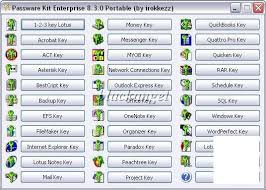
Passware Kit recovers all kinds of passwords for the world's most popular office application files, including Excel, Word, Windows XP/2000/NT/Vista, QuickBooks, Access, FileMaker, Outlook, Outlook Express, Exchange, WinZip, PKZip, ZIP, WinRAR, Network Connections, SQL, BestCrypt, OneNote, PowerPoint, VBA Visual Basic modules, 1-2-3, Internet Explorer, EFS - Encrypted File System, Acrobat, Quicken, Lotus 1-2-3, Lotus Notes, Lotus Organizer, Lotus WordPro, Quattro Pro, Backup, Project, MYOB, Paradox, ACT!, Mail, Schedule+, Money, WordPerfect, WordPro and more.

Passware Kit combines over 25 password recovery modules in a convenient and cost-saving software pack. Passware offers two versions of this pack: Passware Kit and Passware Kit Enterprise. Both Passware Kit and Passware Kit Enterprise include the following password recovery modules: 1-2-3 Key, Acrobat Key, ACT Key, Backup Key, FileMaker Key, Internet Explorer Key, Mail Key, Money Key, MYOB Key, OneNote Key, Organizer Key, Outlook Express Key, Paradox Key, Peachtree Key, PowerPoint Key, Quattro Pro Key, QuickBooks Key, Quicken Key, RAR Key, Schedule Key, WordPerfect Key, WordPro Key and Zip Key.


Hotfile.com: One click file hosting: Passware.Kit.Enterprise.9.7.Build.1665.Retail_2.ra r

Tuesday, January 4, 2011

Internet Download Manager (IDM) 6.03


Description:

Quote:
Internet Download Manager (IDM) is a tool to increase download speeds
by up to 500 percent, resume and schedule downloads. Comprehensive error
recovery and resume capability will restart broken or interrupted
downloads due to lost connections, network problems, computer shutdowns,
or unexpected power outages. Simple graphic user interface makes IDM
user friendly and easy to use. Internet Download Manager has a smart
download logic accelerator that features intelligent dynamic file
segmentation and safe multipart downloading technology to accelerate
your downloads.

Release name: Tonec.Inc.Internet.Download.Manager.v6.03.Beta.Inc l.Keygen.and.Patch-Lz0
Size: 5.15 MB
Download From here
click here

Monday, January 3, 2011

Data Recovery

Smart Data Recovery 4.4 - 
Recover All YOUR Deleted FILES!
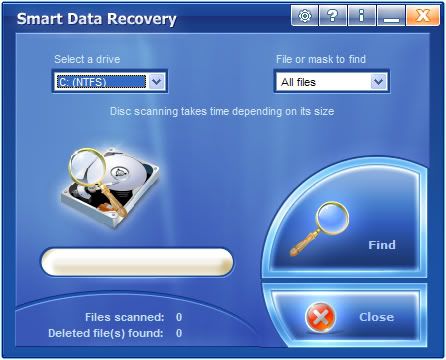


Smart Data Recovery is a data recovery tool for Windows operating system that supports the FAT and NTFS file systems.The Data Recovery is an effective and powerful, easy-to-use software program that enables the recovery of lost data.


Smart Data Recovery is compatible with almost all kinds of data storage - from computer hard drives to digital cameras. It also supports flash drives, USB drives, floppy disks, memory sticks, PC cards, multimedia cards, and secure digital cards. The Data Recovery is able to restore all sorts of files, including electronic documents and pictures. It restores files from FAT32 and NTFS hard drives, has really simple interface and is compatible with Windows operations systems. Our aim is to prevent information loss, and prevent you from wasting your time and money. For different reasons, important documents and user files are sometimes lost. Without a recovery tool for documents and files, this may become a huge problem (one that leads to considerable inconveniences, and requires expensive solutions).

Smart Data Recovery applies a simple yet powerful algorithm, which makes it possible to restore your lost data quickly and effectively.

The Data Recovery can recover any deleted files, including MS Office files, images, mp3, and zip files!


Smart Data Recovery by Smart PC Solutions is a perfect solution for rush data recovery. If you have no specialized experience in data recovery, but need your data back right away with no risk, Smart Data Recovery is an ideal tool for you.



Link 1

From fileserve


Link2

From HotFile

(wait 5 second and click on skip add)


=================================================================


=================================================================


MiniTool Power Data Recovery 6.0.0.1


MiniTool Power Data Recovery 6.0.0.1 | 5.5 MB
Power Data Recovery is a read-only File Recovery Software and Data Recovery Software. Power data recovery software could help you recover all your data no matter the data is lost by accidental deletion, format, re-partition, system crash or virus attack. Power data recovery is able to scan your device sector by sector to recover what ever left on your device. Power Data Recovery provide deep scan module which can scan and analyze raw data format including Microsoft Office files, digital graphics/pictures, audio/video files. Please visit deep scan page for complete raw file format list.

Feature overview
• Recover data after accidental deletion
• Recover data after an accidental format
• Recover data from an inaccessible volume (logical drive)
• Recover data after FAT corruption
• Recover data after repartition (fdisk)
• Recover data from a crashed physical device
• Recover data after an MBR corruption
• Recover data from a hard disk drive, camera card, USB drive, Zip, floppy disk
• Recover data for any error except physical damage

Key Features
• Supports FAT 12/16/32
• Supports NTFS
• Supports NTFS compressed and encrypted files
• Supports Dynamic Volume including Simple Volume, Spanned Volume, Stripe Volume, Mirror Volume and Raid Volume.
• Supports RAW data recovery
• Built-in preview function
• Built-in resume recovery function
• Built-in Recovery Wizard


Download From Hotfile


=================================================================


=================================================================


Power Data Recovery Pro 4.11


Power Data Recovery is a powerful data recovery software. It is one of the fastest and most effective programs of the data recovery software. Power Data Recovery is becoming the first choice when you need data recovery software to help you recover your lost data.Power Data Recovery is a read-only File Recovery Software and Data Recovery Software. Power data recovery software could help you recover all your data no matter the data is lost by accidental deletion, format, re-partition, system crash or virus attack. Power data recovery is able to scan your device sector by sector to recover what ever left on your device.Power Data Recovery provide deep scan module which can scan and analyze raw data format including Microsoft Office files, digital graphics/pictures, audio/video files. Please visit deep scan page for complete raw file format list.

Features:
Feature overview
* Recover data after accidental deletion
* Recover data after an accidental format
* Recover data from an inaccessible volume (logical drive)
* Recover data after FAT corruption
* Recover data after repartition (fdisk)
* Recover data from a crashed physical device
* Recover data after an MBR corruption
* Recover data from a hard disk drive, camera card, USB drive, Zip, floppy disk
* Recover data for any error except physical damage


Download From Hotfile


=================================================================


=================================================================


Share

Twitter Delicious Facebook Digg Stumbleupon Favorites More